
CAD/CAM/CAE Software System Requirements
AutoCAD, SOLIDWORKS, CATIA, Creo, Siemens NX, Mastercam & ANSYS
Complete CAD Software Hardware Requirements Guide

Planning to install professional CAD/CAM/CAE software on your desktop or laptop? Check the processor, RAM, graphics card, storage and operating system before installing engineering design software.
The right computer configuration can improve 2D drafting, 3D modelling, product design, CNC programming and engineering simulation workflows.
This guide brings together the system specifications listed in this article for AutoCAD 2020, SOLIDWORKS 2019/2020, CATIA V5, PTC Creo 3.0, Siemens NX 12, Mastercam and ANSYS 2019 R1.
These are older software releases; requirements can vary by service pack, operating system and installation type. Always verify compatibility with the official documentation for your exact release.
Table of Contents
- 1. AutoCAD 2020 System Requirements
- 2. SOLIDWORKS 2019 / 2020 Requirements
- 3. CATIA V5 System Requirements
- 4. PTC Creo 3.0 Requirements
- 5. Siemens NX 12.0.1 Requirements
- 6. Mastercam Requirements
- 7. ANSYS 2019 R1 Requirements
- 8. Recommended CAD Workstation Configuration
- 9. Frequently Asked Questions
1. AutoCAD 2020 System Requirements

AutoCAD is widely used for 2D drafting, technical drawings and 3D design. The following table contains the AutoCAD 2020 specifications listed in this guide.
| Component | Requirement listed in this guide |
|---|---|
| Operating System | Windows 7 / 8.1 / 10 (64-bit) |
| Processor | 2.5–2.9 GHz (3+ GHz recommended) |
| RAM | 8 GB (16 GB recommended) |
| Disk Space | 6.0 GB free space |
For professional drafting and larger drawings, also consider SSD storage and a graphics adapter supported by the relevant AutoCAD release.
2. SOLIDWORKS 2019 / 2020 System Requirements
SOLIDWORKS 2019 and 2020 Specifications

SOLIDWORKS is used for mechanical design, 3D CAD modelling, assemblies and product development. The source specifications are shown below.
| Component | Requirement listed in this guide |
|---|---|
| Operating System | Windows 10 / Windows 7 SP1 (64-bit) |
| Processor | 3.3 GHz or higher |
| RAM | 16 GB (minimum as listed) |
| Graphics | Certified NVIDIA Quadro / AMD FirePro |
3. CATIA V5 System Requirements
CATIA V5-6R2017 and V5R21

CATIA is used for advanced 3D product design, mechanical engineering and complex surface modelling. The specifications in the original article are:
| Component | Requirement listed in this guide |
|---|---|
| Operating System | Windows 7 / Windows 10 (64-bit) |
| RAM | 4 GB (8 GB recommended) |
| Hard Disk | 10 GB free space |
4. PTC Creo 3.0 System Requirements

PTC Creo supports parametric 3D CAD design and product engineering workflows. The specifications listed in this article are:
| Component | Requirement listed in this guide |
|---|---|
| Operating System | Windows 7 Professional / Windows 8 / Windows 10 |
| RAM | 4 GB minimum |
| Graphics | OpenGL 4.0 support |
5. Siemens NX 12.0.1 System Requirements

Siemens NX is an integrated CAD/CAM/CAE platform used in product design, manufacturing and engineering analysis. The listed specifications are:
| Component | Requirement listed in this guide |
|---|---|
| Operating System | Windows 10 (64-bit) |
| RAM | 8 GB minimum (16 GB recommended) |
| Processor | Intel Core i5 / i7 / Xeon |
6. Mastercam System Requirements
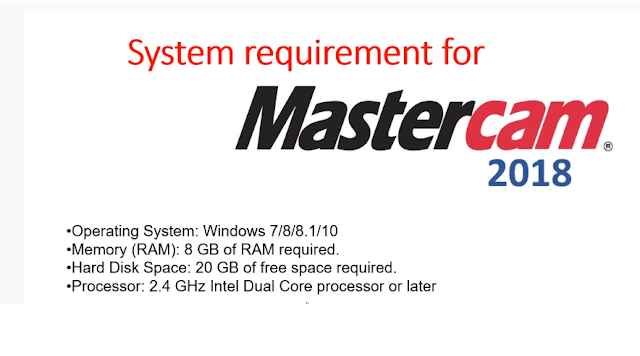
Mastercam is CAD/CAM software used for CNC programming, machining and manufacturing workflows. The source specifications are:
| Component | Requirement listed in this guide |
|---|---|
| Operating System | Windows 10 Professional (64-bit) |
| Processor | Intel i7 or Xeon 3.2 GHz+ |
| RAM | 32 GB |
| Graphics | NVIDIA Quadro (4 GB+) |
7. ANSYS 2019 R1 System Requirements

ANSYS engineering simulation software is used for finite element analysis (FEA), computational fluid dynamics (CFD) and other simulation tasks. The source article lists:
| Component | Requirement listed in this guide |
|---|---|
| Processor | High core count (Intel Xeon / i9) |
| RAM | 16 GB to 64 GB, depending on mesh size |
| Storage | SSD recommended for faster I/O |
8. Recommended CAD Workstation Configuration
If you are planning a new PC build or comparing a laptop for engineering software, use this general buying checklist as a starting point. It is not an official requirement table for any one product.
| Hardware | General workstation guidance |
|---|---|
| Processor | Modern Intel Core i5/i7 or AMD Ryzen 5/7, selected for the application workload |
| RAM | 16 GB for many student and moderate projects; 32 GB or more for larger assemblies and simulation workloads |
| Storage | NVMe SSD, with enough free space for software, project files and temporary data |
| Graphics Card | Choose a GPU and driver certified or supported for the exact software version |
| Display | Full HD or higher resolution suitable for detailed engineering drawings |
| Operating System | Use an operating system officially supported by the selected software release |
Explore Official CAD Software Information
Check product details, supported platforms and licensing information from the software publishers.
Autodesk SOLIDWORKS CATIA Siemens NX PTC Creo Mastercam ANSYS9. Frequently Asked Questions
Q1. Which computer is best for CAD software?
A suitable CAD computer depends on the software and project size. Check processor performance, RAM capacity, SSD storage and graphics compatibility before purchasing a desktop or laptop.
Q2. How much RAM is required for AutoCAD?
The original AutoCAD 2020 specifications in this article list 8 GB RAM, with 16 GB recommended. Requirements for newer AutoCAD versions may differ.
Q3. Is 16 GB RAM enough for SOLIDWORKS?
The original SOLIDWORKS 2019/2020 table lists 16 GB. Larger assemblies and demanding projects may benefit from additional memory. Confirm the requirements for your exact release.
Q4. Which graphics card is suitable for CATIA and SOLIDWORKS?
Use a graphics card and driver combination supported by the relevant software release. Check the publisher's hardware certification information before buying.
Q5. Is an SSD useful for CAD/CAM software?
Yes. An SSD can improve system startup, application loading and project file access. It does not replace the need for adequate RAM and a compatible processor.
Q6. Can I use a gaming laptop for engineering software?
Some gaming laptops can run CAD applications, but compatibility depends on the exact software, GPU, driver and workload. Verify official support before purchasing.
Q7. Where can I check the latest CAD software requirements?
Check the official product documentation and system requirement pages published by Autodesk, Dassault Systèmes, Siemens, PTC, Mastercam and ANSYS.
Conclusion
Choosing the right computer for CAD/CAM/CAE applications starts with checking the system requirements for the exact software release.
AutoCAD, SOLIDWORKS, CATIA, Creo, Siemens NX, Mastercam and ANSYS can have different processor, memory, graphics and operating system needs. Verify the official documentation before upgrading hardware or purchasing a new engineering workstation.